Knowledge7

The Linux and Mobile Solution Provider

  • About
  • Training
  • Services
  • Clients
  • In the news
  • Blog
  • Contact Us
You are here: Home / Archives for Avinash Meetoo

Announcing AndroidMauritius and Knowledge7 forum

Knowledge7 is proud to announce the launching of a new Android portal at androidmauritius.com. During the past 18 months, Android use has exploded around the world and in Mauritius to become the world’s most widely-used operating system for smartphones and tablets. Google has just announced that people have downloaded Android applications more than 10 billion times hence showing how dynamic the Android ecosystem is.

AndroidMauritius provides the latest news concerning Android, reviews Android smartphones and tablets available in Mauritius, and gives tips and tricks.

[img_assist|nid=411|title=|desc=|link=url|url=http://www.androidmauritius.com/|align=center|width=454|height=342]

Remaining faithful to Knowledge7’s motto ‘Sharing Expertise’, we are also glad to announce the launching of our new forum at knowledge7.com/forum. Open-source enthusiasts and IT professionnals will be able to discuss and share their knowledge on the various open-source software and technologies they use on a daily basis such as Linux, PHP/MySQL, Java. Android, etc.

[img_assist|nid=412|title=|desc=|link=url|url=https://www.knowledge7.com/forum/|align=center|width=454|height=277]

We hope that you will find both AndroidMauritius and the Knowledge7 forum useful. Feel free to share with your friends and colleagues.
Our forthcoming training courses

  • No training courses are scheduled.

Services and Notifications

This topic is part of our Android Application Development training

Some Android application depend on data available on the Web. For example, a TopTracks application might show the top 10 tracks of a given artist using a web service such as AudioScrobbler.

Downloading this data can be slow and it is preferable to use a service to do that. In this way, the “main screen” of the application is an Activity and only takes care of displaying the user interface and starting / stopping the download service.

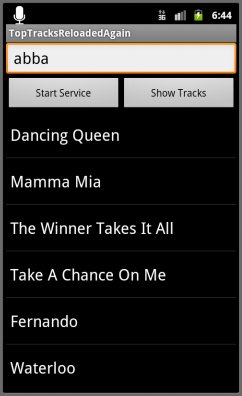
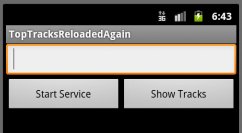
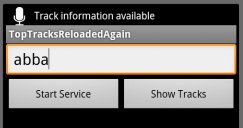
The application to develop allows the user to enter the name of an artist:

Click on Show Tracks does not necessarily display the tracks as this requires the track information to be downloaded first. This is done by clicking on Start Service.

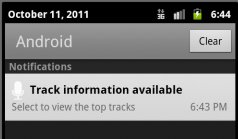
When the data has been downloaded, the service displays a notification in the status bar telling the user that the top tracks have been downloaded. It is only then that the user can click on Show Tracks to get:

This topic is part of our Android Application Development training

Our forthcoming training courses

  • No training courses are scheduled.

More widgets

This topic is part of our Android Application Development training

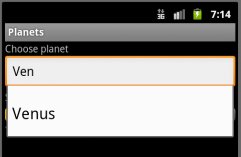
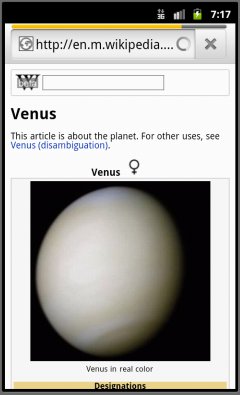
One important Android widget is AutoCompleteTextView which, as its name indicate, is a text view which allows the user to select text from among a list of possibilities based on the initial text typed:

As shown above, the user types “Ven” and is shown Venus on which the user can click on.

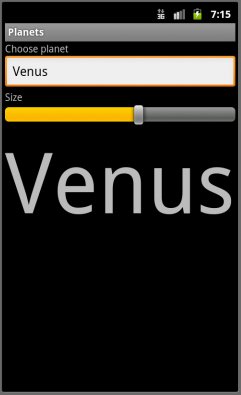
A second useful widget is the SeekBar which allows the user to select one value by dragging (here, a font size):

Finally, it is possible to embed a web browser within any Android application using a WebView. Note that this is different from launching a web browser activity (which launches the native Android web browser):

This topic is part of our Android Application Development training

Our forthcoming training courses

  • No training courses are scheduled.

Preferences, File System and Menus

This topic is part of our Android Application Development training

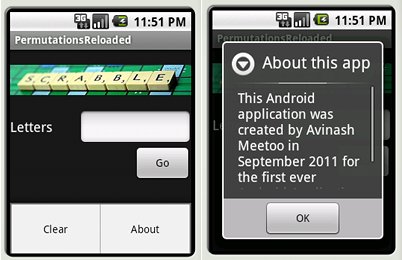
The work to do is to add a menu (also called an options menu) to the PermutationsReloaded application as shown in the picture. Choosing clear will erase everything on screen while choosing about will display a pop-up with some information about the app.

To create the menu, one should build one using the appropriate XML editor and override the onCreateOptionsMenu method of the activity. To handle clicks, the onOptionsItemSelected method will also need to be overriden.

Context menu

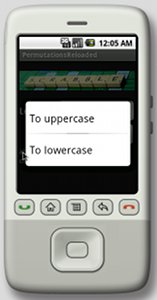
The second step is to add a context menu which opens when one long-presses on any of the permutations. The choices shown are “To uppercase” and “To lowercase” which are explicit enough.

The methods which are important here are onCreateContextMenu and onContextItemSelected as well as registerForContextMenu and unregisterForContextMenu.

Something noteworthy is that onCreateContextMenu is executed each time a context menu is shown (and not only once) and that one of its parameters is the view on which the long-press has been done.

Managing Preferences

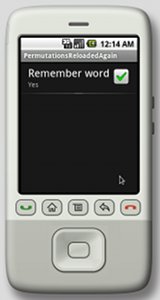
The last enhancement to bring to the application is to allow the user to specify whether the last word entered should be remembered. If yes, the next time the application is started, the word should already appear in the EditText and the permutations shown.

To do that, a preference screen should be created using the XML editor, then a class derived from PreferenceActivity should be created and the onCreate method overriden. This new activity should be manually added to AndroidManifest.xml.

When this activity is launched (using, for example, startActivity), the Android framework will automatically store the preferences.

Finally, the application will have to be updated to store the word entered if the user has chosen to do so as well as restore that word when the application is resumed. The way to do that is to get a SharedPreference object from the PreferenceManager.

Accessing Files

Android applications can access files residing at three distinct places:

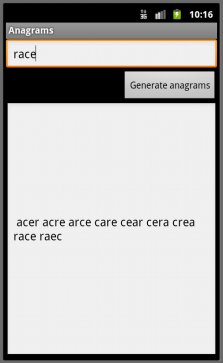
  • Found in the application APK itself. This file is read-only as it is considered to be one of the static resources of the application. The work to do is to develop an application called Anagrams which given a word shows all the various anagrams of that word. Of course, this requires a dictionary and it will be stored in the APK. The key method to use here is openRawResource to get access to that dictionary.
  • Found in flash memory. The second version of the application provides a simple menu (with load / save) which, depending on the item selected, either load or saves the anagrams found. This second version of the application loads and saves from flash memory.
  • Found on the SD card. The third version of the application read and writes data on the SD card instead of using flash memory.
This topic is part of our Android Application Development training

Our forthcoming training courses

  • No training courses are scheduled.

Knowledge7 sponsors Terre de Paix

For our first Corporate Social Responsibility contribution, we have decided to sponsor Fondation Pour L’Enfance – Terre de Paix. This NGO aims at combating poverty in general and has among its objectives to carry out child care activities in a secular and non-discriminatory way.

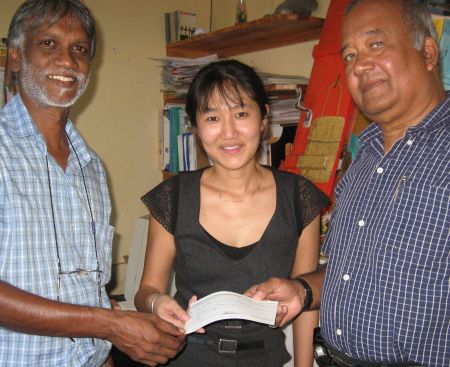
On June 30, the chairman of Knowledge7, Mr Jaynarain Meetoo, presented a cheque to Mr Alain Muneean, the secretary of Terre de Paix and Mrs Patricia Yue to encourage them in their efforts to make a better world for children.

Why did we choose this NGO? Simply because Knowledge7 strongly believes that education is the key to the success of our future generations.

Our forthcoming training courses

  • No training courses are scheduled.

A Quick Start

This topic is part of our Android Application Development training

Android applications generally have four types of components:

  • An activity represents a single screen with a user interface. An application can have multiple independent activities.
  • A service is a component that runs in the background to perform long-running operations or to perform work for remote processes. For example, a service might play music in the background while the user is in a different application.
  • A content provider manages shared application data. Other applications can query or even modify the data through the content provider.
  • A broadcast receiver is a component that responds to system-wide broadcast announcements. A typical broadcast receiver might initiate a service to perform some work based on the event.

It is important to understand that any application can start another application’s component… but only indirectly as Android runs each application in a separate process. To do that, the application must deliver a message to the system that specifies its intent to start a particular component in a different application. The system then activates that component.

Work to do

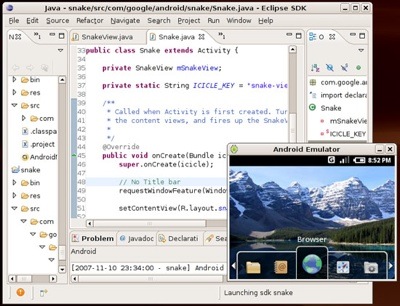
Let’s start quickly. The first step is to setup the development environment as explained in the previous topic: (Java, Eclipse, Android SDK and Platform Tools).

At this point, it is possible to create an Android Virtual Device (AVD) and run an emulator.

The next step is to launch Eclipse, install (if needed) and configure the Android Development Tools plugin and start developing Android applications!

HelloWorld

The first application to develop is HelloWorld which should simply display a nice message in an activity when launched. The content of HelloWorld should be explored (AndroidManifest.xml, bin/, libs/, res/, src/, assets/, gen/ and proguard.cfg) and understood. HelloWorld should be launched in an Android emulator to check whether it’s working correctly. It is also interesting to launch it on a real Android devices (because we can) 🙂

Now

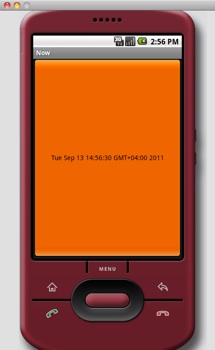
The second application to develop is called Now. It displays one button which fills in the whole of its activity. When the button is clicked, the current date and time will be updated in the button’s label.

The way to do that is to add an Android button to the activity, setOnClickListener appropriately (i.e. to update the label to the current date and time). The easiest way to do that is to use a Java inner class at this point.

The AndroidManifest.xml generated by Eclipse contains an activity, an intent-filter whose purpose is to make the activity appear in the launcher and, very importantly, specifies a minSdkVersion (which is an integer corresponding to a specific version of Android) and, optionally, a targetSdkVersion:

  • 1 = Android 1.0 (obsolete)
  • 2 = Android 1.1 (obsolete)
  • 3 = Android 1.5
  • 4 = Android 1.6 (obsolete)
  • 5 = Android 2.0 (obsolete)
  • 6 = Android 2.0.1 (obsolete)
  • 7 = Android 2.1
  • 8 = Android 2.2
  • 9 = Android 2.3-2.3.2 (obsolete)
  • 10 = Android 2.3.3-2.3.7
  • 11 = Android 3.0
  • 12 = Android 3.1
  • 13 = Android 3.2
  • 14 = Android 4.0-4.0.2
  • 15 = Android 4.0.3-4.0.4

NowReloaded

The next application to be developed is an enhanced version of Now which, instead of using Java code to create a button uses an XML-layout generated graphically by the ADT plugin in Eclipse.

The Java code needs to be modified to use findViewById and care must be taken to really understand the difference between wrap_content and fill_parent (renamed to match_parent as from API level 8).

Forex

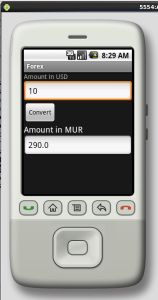
The next application is called Forex and allows the user to enter an amount in USD and, when the convert button is clicked, the MUR amount is calculated and displayed.

Airplanes

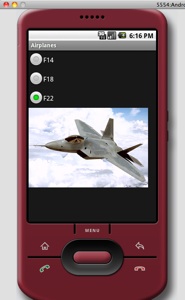
The application to build displays different airplanes based on which of the three radio buttons has been clicked on. The essential aspect of this application is that the radio buttons are found within a RadioGroup.

This topic is part of our Android Application Development training

Our forthcoming training courses

  • No training courses are scheduled.

Enter the Android Market with our brand new training

Android, developed by Google, is now the top-selling smartphone platform powering more than 100 million devices in the world. Android smartphones (and, now, tablets) are made by companies such as HTC, Samsung, Sony-Ericsson, Motorola, LG, Acer, Archos, Dell, ViewSonic and Toshiba. Fortune Magazine observes that Android powers 35% of the smartphones sold in the US in 2011 while Apple has 18%, Blackberry 14% and Microsoft 2% of the market share.

Applications can be easily added to Android smartphones and tablets by downloading them from the Android Market which hosts more than 240,000 free and paid applications which have already been downloaded more than one billion times.

Clearly, Android is massive and the market for Android applications is ever increasing.

Developing applications for the Android platform

The Android platform is open source software and the tools which are required to develop Android applications are readily available. Interestingly, Android applications are written in Java using a subset of the Java standard classes as well as Android specific classes. Someone willing to master Android apps development needs to be knowledgeable in object-oriented programming with Java.

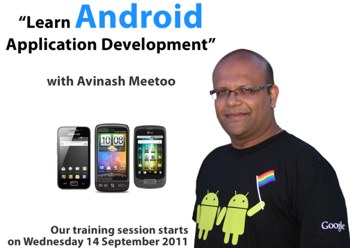
At Knowledge7, we are proud to launch our new Android Application Development training starting on Wednesday 14 September and will run over five consecutive Wednesdays.

Over the duration of the training, participants will develop Android applications in our state of the art computer lab and test the applications on real Android devices. We will cover the following topics during the training: the user interface preferences, file system and menus, services, accessing databases, lists and adapters, broadcast receivers, content providers and system services (e.g. alarms, GPS and various sensors).

At the end of the training, the participants will know how to develop powerful Android applications ready to be submitted to the Android Market.

The trainer will be Avinash Meetoo, Founder and Managing-Director of Knowledge7. He has extensive experience of object-oriented programming, Java and Android development. During the last world cup, Avinash created an Android application, World Cup 2010 TV Guide, which was downloaded more than 15,000 times by people all over the world.

Do not hesitate to contact us on 5834-9001 for more details.

Our forthcoming training courses

  • No training courses are scheduled.

Master PHP/MySQL for real

[img_assist|nid=348|title=|desc=|link=none|align=center|width=460|height=311]

Since their introduction a few years ago, PHP and MySQL have become the de-facto standard web technologies used to power most blogs and websites. They are used, for example, by Facebook and Wikipedia.

Learning the basics of PHP and MySQL is easy. There are a lot of online resources available, most notably the official PHP and MySQL documentation.

But what if you want to go further?

What if you want to learn advanced PHP techniques such as sanitization, validation, templating, sessions, cookies, PHP data objects (PDO) and file uploads? What if you need to master the new aspects of MySQL like transactions, stored procedures, triggers, locking and partitioning?

Your best bet is to follow a quality training.

At Knowledge7, we are proud to offer you 10% of discount for our next Web Development with PHP and MySQL training starting on Monday 8 August 2011. Our course covers all of the above and more! Our training, Avinash Meetoo, is a well known IT professional and has extensive experience in both PHP and MySQL.

Joelle followed this training a while back and would like to share some thoughts with you:

[img_assist|nid=347|title=|desc=|link=none|align=left|width=149|height=224]

Who are you and what do you do?
Joelle Teck Yong, a Web Developer at Mauritius Telecom – Telecom Plus, now with 5 years’ experience in web development field.

Why did you choose to follow our Web Development with PHP and MySQL training?
To get a refresh on the fundamentals of PHP and MySQL.

What has the training allowed you to achieve at work?
This course helped me to pay more attention to details that sometimes I thought were not important.

Would you recommend colleagues and friends to follow this training?
Yes, the trainer knows the topic very well with good practical examples in a friendly environment.

Register for our Web Development with PHP and MySQL training and get your 10% of discount. Places are limited so be quick! Call us on 5834-9001 for more information.

Our forthcoming training courses

  • No training courses are scheduled.

Further performance tuning

This topic is part of our Web Development with PHP and MySQL training

Schema optimisation

PROCEDURE ANALYSE() examines the result from a query and returns an analysis of the results that suggests optimal data types for each column that may help reduce table sizes.

It is important that the type of each column be optimal. In general, smaller is better and NULL should be avoided (especially for columns which are going to be indexed) as the NULL value imposes a performance penalty in MySQL.

The work to do is to run each table in the sample database through PROCEDURE ANALYSE() and optimise the type of the columns if required.

Indexing

MySQL supports indexes which are created with the CREATE INDEX command.

Assuming we have created an index consisting of three columns, C1, C2 and C3, the query optimiser will use this index (and therefore speed up query execution) when it matches:

  • fully (i.e. C1, C2 and C3 match)
  • with a leftmost prefix (C1)
  • with a column prefix (beginning of C1)
  • with a range of values (range of C1 values)
  • with one element of C1 and a range on C2

When writing an SQL query, it is advisable to pay special attention to the WHERE clause. If an indexed column appears there, it is better for it to be placed on its own on one side of the comparison function. When this is done, the MySQL query optimiser will use the index.

The SHOW INDEX FROM command can be used to get information on existing indexes. The OPTIMIZE TABLE command is used when fragmentation occurs (either in the table or in indexes).

The work to do is to identify slow SQL queries on the sample database and decrease their runtime by judiciously using indexes.

Partitioning

MySQL can store the data in tables in distinct user-defined partitions. As written in the MySQL manual,

“In effect, different portions of a table are stored as separate tables in different locations. The user-selected rule by which the division of data is accomplished is known as a partitioning function, which in MySQL can be the modulus, simple matching against a set of ranges or value lists, an internal hashing function, or a linear hashing function.”

The effects of partitioning are diverse. First, partitioning can help in making MySQL read less data when executing a query if the query only refers to the data in a distinct partition (this is called pruning). Secondly, partitioned data is easy to maintain i.e. when having to discard old data by dropping a whole partition. Thirdly, partitions can be on different disks and therefore can be accessed concurrently.

In fact, partitioning can be thought as being a kind of coarse-grained indexing.

MySQL supports different kinds of partitions: range, list, column, etc.

Unfortunately, MySQL suffers from one very serious limitation: partitioned tables do not support foreign keys.

Partitions can be specified when doing a CREATE TABLE or, later, with ALTER TABLE.

The work to do is to add partitions to the existing tables in the same database and examine how query execution is impacted.

The MySQL event scheduler

MySQL has an event scheduler which can be used to run user-specified queries in the future and on a regular basis. By default, the scheduler is off and can be activated with SET GLOBAL event_scheduler = 1;.

When this is done, CREATE EVENT and ALTER EVENT can be used.

The work to do is to explore the various types of events which can exist and the various ways events can be created.

This topic is part of our Web Development with PHP and MySQL training

Our forthcoming training courses

  • No training courses are scheduled.

Performance tuning

This topic is part of our Web Development with PHP and MySQL training

Benchmarking

When a database becomes big, query performance can suffer. It becomes important to measure the performance of the system and this is called benchmarking. We can measure many things like number of transactions per unit time, response time, the scalability or support for concurrency. When benchmarking, it is important not to use only a subset of real data, incorrectly distributed data or test using a single connection even though the database is supposed to be used concurrently.

ab

Various tools exist which help to benchmark a web application. One of them is the Apache Benchmarking tool (ab) which benchmarks the web application as a whole i.e. the full stack (operating system, database, web server, scripting language).

The work to do is to use ab to evaluate the performance of the web application written before.

mysqlslap

Another important benchmarking tool is mysqlslap which is distributed with the MySQL database. mysqlslap measures the performance of the database (and not the web application) and has various capabilities:

  • Testing using automatically generated tables and SQL queries
  • Measuring performance when the database is accessed concurrently
  • Running tests many times to get more significant results
  • Using existing schemas and custom SQL queries when measuring performance
  • Producing performance reports

The work to do is to use mysqlslap to evaluate the performance of the standard MySQL employees sample database.

Benchmarking sometimes shows that query performance is not good enough. The question then is to know which query is too slow and to find ways to make it run more quickly. Those two steps are called profiling and optimisation.

Profiling

MySQL has a slow query log (which is inactive by default) which logs all SQL queries which are taking too long to execute. Whenever an application is slow, the slow query log should be enabled and monitored to discover the culprits. This can be done with the SET GLOBAL slow_query_log = 1; command. It is also possible to change the threshold above which queries are considered to be slow. Do SET long_query_time = 2; for 2 seconds for example.

MySQL provides many ways for a programmer (or a database administrator) to discover why an SQL query is performing badly.

MySQL server status variables provide information about the execution of queries within MySQL. There are a lot of variables but the most relevant for performance have names starting with:

  • Bytes_ (bytes received and sent)
  • Com_ (commands the server executed)
  • Created_ (temporary tables created)
  • Handler_ (storage engine operations e.g. InnoDB)
  • Select_ (various types of join execution plans)
  • Sort_ (various types of sort operations)

The various types of join execution plans. Some of them are:

  • Select_scan: refers to a table that is completely read in sequence from the hard drive.
  • Select_range: refers to a table that was read from the hard drive only in the necessary places to satisfy a limited range of conditions.
  • Select_full_join: is the same as Select_scan with the difference that Select_full_join applies to the second and subsequent tables in the join plan for a multiple table query.
  • etc.

The work to do is to use MySQL server status variables as well as the EXPLAIN command to fully understand how queries are executed.

(MySQL also provides the following commands:

SET profiling = 1;

SHOW PROFILES;
SHOW PROFILE FOR QUERY 1;

which give the durations of the various phases of a query)

This topic is part of our Web Development with PHP and MySQL training

Our forthcoming training courses

  • No training courses are scheduled.
« Previous Page
Next Page »

Looking for something?

Want to know more?

Get our newsletter

Discover the latest news, tips and tricks on Linux, the Web and Mobile technologies every week for FREE

This work is licensed by Knowledge7 under an Attribution-NonCommercial-ShareAlike 4.0 International (CC BY-NC-SA 4.0) license.