Knowledge7

The Linux and Mobile Solution Provider

  • About
  • Training
  • Services
  • Clients
  • In the news
  • Blog
  • Contact Us
You are here: Home / Archives for Topic

NFS and Samba

This topic is part of our Linux Network Services and Security training

Network File System

Network File System (NFS) allows remote hosts to mount file systems over a network and interact with those file systems as though they are mounted locally. NFS is configured by editing /etc/exports. Note that the defaults settings for NFS shares are ro (read-only), sync, wdelay and root_squash. It is possible to use all_squash and specify anonuid and anongid. Hostnames should follow a specific format.

The mount command (when used with the appropriate options) can be used to connect to an NFS share. Naturally, one can also edit /etc/fstab so that NFS mounts are done automatically at boot time.

Samba

Samba is an important software as it allows Linux computers to easily communicate with computers running Windows.

Samba can:

  • Serve directory trees and printers to Linux, UNIX, and Windows clients
  • Assist in network browsing (with or without NetBIOS)
  • Authenticate Windows domain logins
  • Provide Windows Internet Name Service (WINS) name server resolution
  • Act as a Windows NT-style Primary Domain Controller (PDC)
  • Act as a Backup Domain Controller (BDC) for a Samba-based PDC
  • Act as an Active Directory domain member server
  • Join a Windows NT/2000/2003/2008 PDC

What Samba cannot do:

  • Act as a BDC for a Windows PDC (and vice versa)
  • Act as an Active Directory domain controller

Samba can be configured by editing /etc/samba/smb.conf but most people prefer using a graphical tool such as SWAT (it is important to add FLAGS = IPv4 in its xinetd configuration). When configuring Samba, it is possible to create a share:

[shared]
comment = This is a Linux share
path = /home/shared/
valid users = john, jane
public = no
writable = yes
printable = no
create mask = 0644

Valid users (e.g. john and jane in the above example) need to be assigned SMB passwords which can be distinct from their Linux password. The smbpasswd command need to be used.

Shares can then be accessed using Nautilus and even mounted in Linux using the cifs filesystem type. Samba comes with a number of useful command line tools which system administrators should be aware of.

This topic is part of our Linux Network Services and Security training

Our forthcoming training courses

  • No training courses are scheduled.

Infrastructure services

This topic is part of our Linux Network Services and Security training

Dynamic Host Control Protocol (DHCP)

Linux can be used as a DHCP server.

Quoting the official Red Hat Deployment guide, “DHCP is useful for automatic configuration of client network interfaces. When configuring the client system, the administrator chooses DHCP instead of specifying an IP address, netmask, gateway, or DNS servers. The client retrieves this information from the DHCP server. DHCP is also useful if an administrator wants to change the IP addresses of a large number of systems. Instead of reconfiguring all the systems, he can just edit one DHCP configuration file on the server for the new set of IP addresses. If the DNS servers for an organization changes, the changes are made on the DHCP server, not on the DHCP clients. When the administrator restarts the network or reboots the clients, the changes will go into effect.”

The preferred way to configure a DHCP server is to start from a sample dhcpd.conf.

Domain Name Service (DNS)

Linux provides Bind, a full-fledged DNS server. Bind can operate as a caching nameserver as well as a DNS server which is fully authoritative for a zone (or many zones). The preferred way to configure Bind is to start from sample named.conf and zones.

This topic is part of our Linux Network Services and Security training

Our forthcoming training courses

  • No training courses are scheduled.

Using UI Component tags

This topic is part of our Web Application Development in Java training

Struts contains a number of powerful UI (User Interface) components. In essence, each UI component:

  • Generate (complex) HTML
  • Links HTML form fields to Java properties
  • Does automatic type conversion and validation

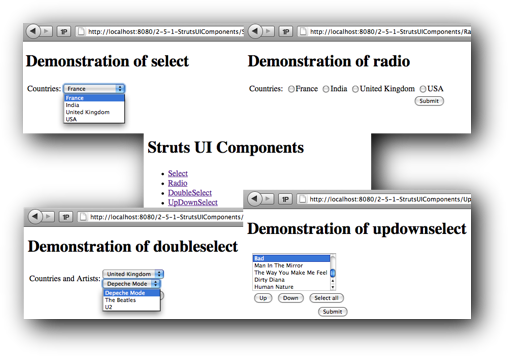
Out of the tens of UI components, four are very powerful while being relatively easy to use. They are:

  • select
  • radio
  • doubleselect
  • updownselect

Work to do

Write a Struts web application which showcases the four above UI components. Look at the image above for some inspiration…

Bonus

Want autocompletion like in Google Search? Look no further than the autocompleter tag. Try it!

This topic is part of our Web Application Development in Java training

Our forthcoming training courses

  • No training courses are scheduled.

Building the view

This topic is part of our Web Application Development in Java training

Struts has different categories of tags which are used within JSP views:

Control tags

  • if
  • elseif
  • else
  • append
  • generator
  • iterator
  • merge
  • sort
  • subset

Data tags

  • a
  • action
  • bean
  • date
  • debug
  • i18n
  • include
  • param
  • property
  • push
  • set
  • text
  • url

Non-Form tags

  • actionerror
  • actionmessage
  • component
  • div
  • fielderror
 Form tags

  • checkbox
  • checkboxlist
  • combobox
  • doubleselect (Powerful!)
  • head
  • file
  • form
  • hidden
  • inputtransferselect
  • label
  • optiontransferselect
  • optgroup
  • password
  • radio (Very useful!)
  • reset
  • select (Very useful!)
  • submit
  • textarea
  • textfield
  • token
  • updownselect (Powerful!)

Ajax tags

  • a
  • autocompleter (Powerful!)
  • bind
  • datetimepicker
  • div
  • head
  • submit
  • tabbedpanel
  • textarea
  • tree
  • treenode
This topic is part of our Web Application Development in Java training

Our forthcoming training courses

  • No training courses are scheduled.

Adding workflow with interceptors

This topic is part of our Web Application Development in Java training


We will, first of all, rewrite the BestSongs application using Struts:

  • Create a new web application called BestSongsStruts
  • Add the required libraries (including the MySQL connector)
  • Copy the models from a previous project in an appropriate package
  • Add an action called Countries with a getter for a property called countries which returns a List of Country objects (use the DAO)
  • Write the view (using Struts tags like s:iterator and s:a)
  • Test!
    • Artists is slightly different from Countries as it require a parameter (countryid) to work properly. It therefore needs to implement the ParameterAware interface (and, consequently, implement the setParameters method).

      • Implement the Artists action and its corresponding view.
      • Do the same for Songs
      • Test!

      Adding a logging interceptor

      In Struts, interceptors are used to modify the workflow of an application.

      In all Struts applications, there exist a default stack of interceptors (notice ParametersInterceptor, ActionMappingParametersInteceptor and StaticParametersInterceptor).

      Also notice that there is an interceptor called “logger” but it is not part of the default stack.

      Let us add the logger before the default stack and let us observe what happens:

      <action name="Songs" class="com.knowledge7.strutsbestsongs.actions.Songs">
          <interceptor-ref name="logger" />
          <interceptor-ref name="defaultStack" />
          <result>/Songs.jsp</result>
          <result name="error">/Error.jsp</result>
      </action>
      

      The order can also be changed.

      Creating a custom logging interceptor

      User-made interceptors are straightforward to write and they can then be added to any Action (e.g. Songs). We will now write a custom logging interceptor which will log everything in a table in the database:

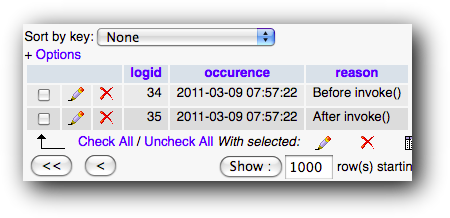
      • Create a new table with fields: logid (an autonumber), occurence (a timestamp) and reason a varchar(255).
      • Create a LogDAO with one static method “void log(String reason)”
      • Create a class called DatabaseLoggingInterceptor (which needs to implement the Interceptor interface and the implement method)
      • Declare the interceptor in struts.xml as databaseLogger
      • And, finally, replace logger (above) by databaseLogger
      • Test!

      Enjoy!

      This topic is part of our Web Application Development in Java training

Our forthcoming training courses

  • No training courses are scheduled.

Using Struts actions

This topic is part of our
Web Application Development in Java
training

Struts is a family of powerful MVC frameworks for Java.

Struts 1.x is the previous generation framework which is still being used in a lot of legacy applications.

Struts 2.x is a new framework (originally known as WebWork 2) which is now popular. As it is an MVC framework, it naturally supports Models, Views as well as Controllers.

In Struts 2.x, a request is processed by a Filter called FilterDispatcher. This filter is configured by an XML file called struts.xml (found in WEB-INF/classes) and which contain Actions.

When processing a request, the FilterDispatcher checks whether it matches one of the defined Actions. If true, the execute() method of the Action is called (this is where the Action can interact with Models) and that method then returns one of the various Struts 2.x constants (SUCCESS, INPUT, ERROR, etc.) An appropriate View is then shown depending on the return value. The View can easily access the properties of the Action.

In essence, Actions are like Controllers. Their execute method is called when a request comes. The Action interacts with Models and select a View.

Work to do

  • Create a new Java dynamic web application.
  • Add to it the following Struts libraries (commons-fileupload, commons-io, freemarker, javassist, ognl, struts2-core and xwork-core). The libraries can be found in the Struts 2 lib directory except for javassist which is the Blank demo application.
  • Add a filter (FilterDispatcher) with URL pattern /* (i.e. everything!)
  • Remove the welcome-file-list
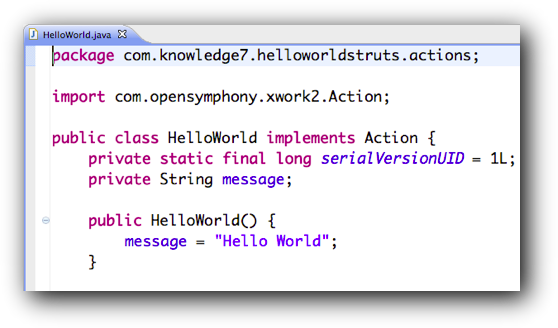
  • Create a HelloWorld JavaBean which implements Action and, consequently, the execute() method. Make sure it has (at least) a getter for a property called message (a String).
  • Test it using unit testing.
  • Create /WEB-INF/classes/struts.xml and reference the HelloWorld action in it. Make sure that the default view is HelloWorld.jsp
  • Create HelloWorld.jsp and make sure you interact with the Action in it. The best way to do that is to use the Struts 2.x tag library. Here, <s:property> needs to be used.
  • Test it!

Let’s now create a simple menu:

  • Create a View called Welcome.jsp. Make sure that the view has a link to the HelloWorld action.
  • Add a mapping without an action to struts.xml
  • Test!
  • Change the mapping to wildcard mapping.
  • Test!

Adding a login form

Struts 2.x also supports form tags which allow complex forms to be built very quickly.

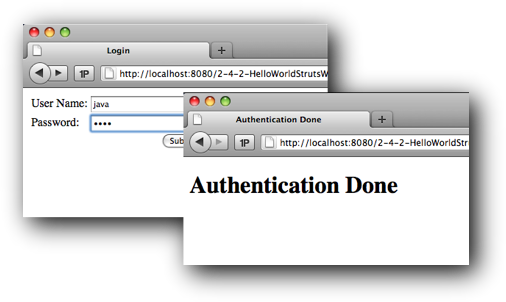
  • Create a Login form with two fields: username and password. Do not use the classical HTML tags here. Use the Struts 2.x tags instead. The action of the form should be Authenticate (which has not been written yet!)
  • Add this view as a mapping with a corresponding action in struts.xml
  • Add Login to the menu to make it easier to access.
  • Test!
  • Add the Authenticate action. execute should only return SUCCESS when both the username and the password are “java” and, consequently, a nice “Authentication Done” needs to be shown. If one of the values has not been entered, the login form needs to be displayed again. Otherwise, “Authentication Error” should be displayed. How many new views do we need?
  • Test!

Validation on the client

Struts 2.x has full support for server-side and client-side validation.

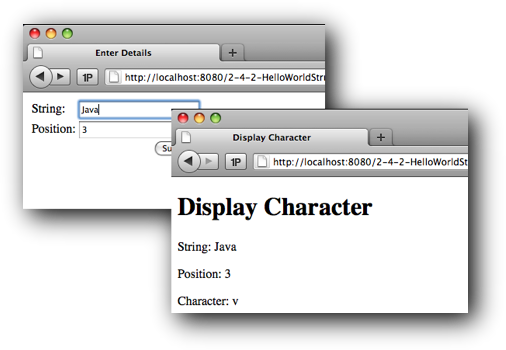
  • Add a EnterDetails view as pictured above.
  • Make sure that the GetCharacter as well as DisplayCharacter view work well.

Now, let’s make validation work by (1) adding validate=”true” to the form and (2) by adding something similar to the following to the GetCharacter action:

@Validations (
	requiredFields = {
		@RequiredFieldValidator(fieldName="string", message="The string needs to be specified"),
		@RequiredFieldValidator(fieldName="position", message="The position needs to be specified")
	},
	requiredStrings = {
		@RequiredStringValidator(fieldName="string", message="The string needs to contain characters")
	},
	stringLengthFields = {
		@StringLengthFieldValidator(fieldName="string", minLength="1", maxLength="100", message="The string must be between 1 and 100 characters long")
	},
	intRangeFields = {
		@IntRangeFieldValidator(fieldName="position", min="1", max="100", message="The position should lie between 1 and 100")
	}
)

What do you notice? Where is validation being done?

Validation on the server

In some applications, it’s better (not to say simpler) to validate on the server instead of on the client. To do that, do the following simple changes:

  • Remote validate=”true” in the JSP.
  • Make the action extend ActionSupport instead of implementing Action

What do you observe when the application is run?

Further validation

ActionSupport has a method called validate() which can be used for more complex validations. For example, validate() can query databases and do calculations before emitting errors.

This topic is part of our
Web Application Development in Java
training

Our forthcoming training courses

  • No training courses are scheduled.

Using JSP Standard and Custom Tags

This topic is part of our
Web Application Development in Java
training

JSP is a powerful technology and it gets even more powerful when used properly!

As mentioned in the previous topic, most web applications are built using an MVC architecture. Most of the time, the controller will be a Java servlet, the model a POJO (Plain Old Java Object) or a JavaBean which exposes methods and the views are JSP.

We saw how to add an attribute to a request in the controller and access it from the JSP using EL and the requestScope object. In the previous example, the attribute was a scalar value. In most large applications, the attribute(s) might be complex object hierarchies and, consequently, it is important that JSP tags be extended to include conditionals, looping constructs and so on.

This is the role of JSTL, the JSP Standard Tags Library.

We will rewrite the Countries/Artists/Songs application to be compliant with the MVC architecture. We will also make sure that views leverage the tags found in JSTL. We will follow the following steps:

  • We create three model POJOs: Artist, Country and Song. Those classes have the same attributes as in the database and appropriate getters/setters.
  • We import the singleton DatabaseConnection.
  • The next step is to create Data Access Objects (DAO) so that our model is decoupled from the underlying database. We also create a new runtime exception, DAOException, to be thrown instead of SQLException in case of problems. Create DAOException, CountryDAO (with a findAll method which returns a list of Countries) and CountryDAOTest.
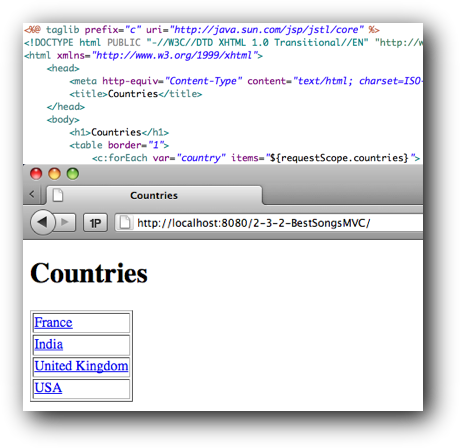
  • The next step is to create CountriesController (as a Java Servlet). This controller uses CountryDAO to get a list of all countries, assigns the list as an attribute to the request and selects a view (CountriesView.jsp).
  • As the view requires JSTL, it is important that jstl.jar and standard.jar (from the Tomcat installation) be added to the project.
  • Finally, the view, CountriesView.jsp, is written.
    • CountriesView.jsp uses the JSTL Core tag library (taglib) so the following line is needed:

      • <%@ taglib prefix="c" uri="http://java.sun.com/jsp/jstl/core" %>

      Furthermore, the view will get the list of countries from the requestScope and loop through the countries using the c:forEach tag.

      For information, JSTL Core contains the following tags:

      • c:catch
      • c:choose
      • c:forEach
      • c:forTokens
      • c:if
      • c:import
      • c:otherwise
      • c:out
      • c:param
      • c:redirect
      • c:remove
      • c:set
      • c:url
      • c:when

      Displaying artists…

      The next step is to write ArtistsDAO (with a findByCountryid(int countryid) method which returns a list of artists who are from the same country), ArtistsController (which now takes one parameter, the countryid). Interestingly, this means that two views need to be writter, the expected ArtistsView.jsp and ErrorView.jsp in case, for instance, countryid is not valid.

      ArtistsView.jsp will, of course, be written using JSTL tags (including, most probably, c:if, to know when to display the list of artists). Accessing a request parameter (which is not the same thing as a request attribute) is done through the param object in JSP.

      … and songs + and the rest

      To display songs, we need SongDAO (with the findByArtistid(int artistid) method), SongsController (which now takes two parameters: countryid and artistid) and the corresponding view, SongsView.jsp.

      The rest is straightforward:

      • Adding AddToCartController (which when given a songid adds that song to the shopping cart belonging to the session) requires that the method findById(int songid) be implemented in SongDAO. For cosmetic reasons, an AddToCartView.jsp is also needed.
      • CartController is trivial because it just forwards to CartView.jsp. The shopping cart is accessed through the sessionScope object and, as it is a list of songs, a c:forEach can be used to display them.
      • Clearing the cart is left as an exercise…

      Using custom tags

      The standard tag library is very useful as it is but it is also possible to create custom tag libraries with custom tags. For example, we will do the following:

      • Create a tags folder in WEB-INF
      • Add a simple footer.tag to it
      • Refer to the footer tag from the existing JSP
      • Add a header.tag which takes as a parameter a title
      • Refer to the header tag from the existing JSP
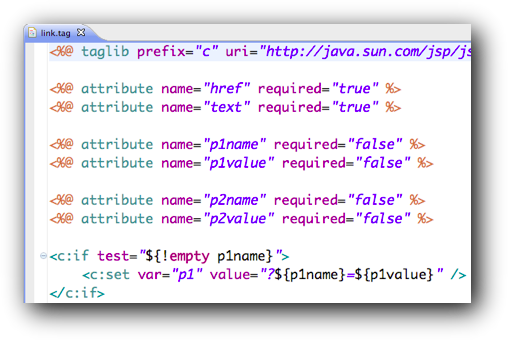
      • Finally, create and use a link.tag which makes writing the various HTML links in the web application easier. One possibility is illustrated above.
      This topic is part of our
      Web Application Development in Java
      training

Our forthcoming training courses

  • No training courses are scheduled.

Creating JavaServer Pages (JSP)

This topic is part of our Web Application Development in Java training

JavaServer Pages (JSP) first appears in 1999 as an alternative to ASP and PHP for writing server-side software easily.

Like ASP and PHP, JSP allows code (in its case, Java) to be interleaved with HTML. The Java code is delimited by <% and %> and can refer to the following objects:

  • out, a PrintWriter
  • request, an HttpServletRequest
  • response, an HttpServletResponse
  • session, an HttpSession. Note that a JSP always runs within a session. This is mandated by the J2EE specs.

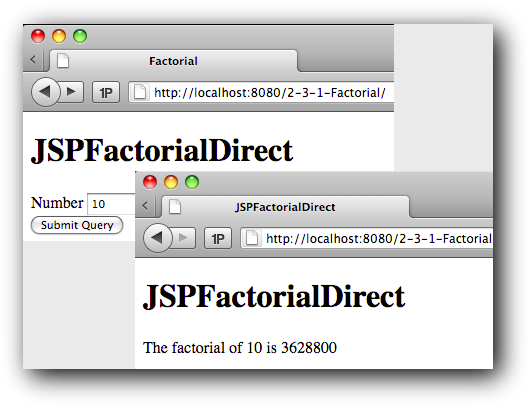
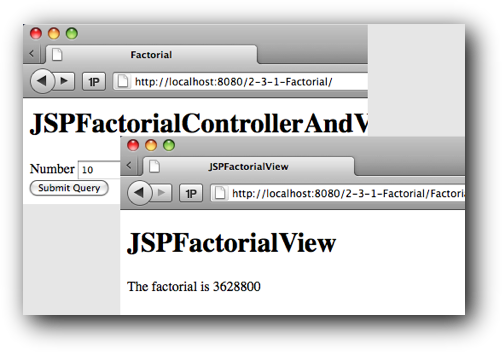
Write a small Java web application which:

  • allows the user to enter an integer and when submit is clicked
  • calculates and shows its factorial by using a JSP. This means that the code for doing the calculation as well as for creating the output needs to belong to the same JSP.

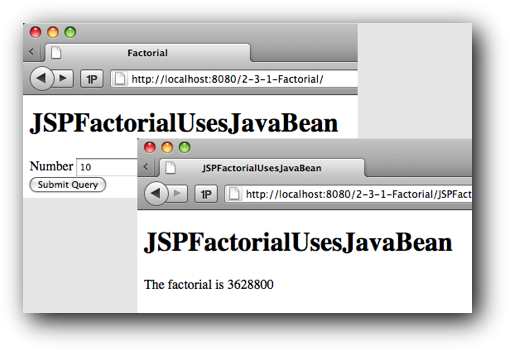
We are going to enhance the web application so that the logic for the calculation of the factorial is encapsulated in a distinct class. We will make that class follow JavaBean conventions so that we can use it easily from a JSP. In essence, a class is a JavaBean if the following are all true:

  • It must have a public default constructor
  • It must provide getters and setters for accessing attributes
  • It must be serializable

JavaBeans can then easily be used, properties set and retrieved

Web applications generally follow a MVC (Model View Controller) architecture. In such an architecture, the application has three types of components:

  • Controllers receive HTTP requests, call upon Models for all domain logic and then select a View
  • Models manage the domain logic (business rules as well as data)
  • Views render HTTP responses

We can enhance our application to become MVC compliant by implementing a controller as a Servlet. The controller gets a request, calls appropriate methods on our existing JavaBean to get the factorial (this is our model), sets the factorial as another attribute of the request and then selects a JSP (our view) for producing an HTML response.

The JSP can then access the attribute from its requestScope using Expression Language. The requestScope maps attribute names to their values. It allows JSP to access the attributes of the request object.

This topic is part of our Web Application Development in Java training

Our forthcoming training courses

  • No training courses are scheduled.

Hardware and Architecture

System administrators should monitor Linux installations on a regular basis and detect if there is any hardware anomaly. For example, performance might not be optimal or resource clashes might be happening.

The various subsystems that need to be carefully monitored are:

  • BIOS settings
  • Buses, ports, IRQs, and DMA
  • Hard drives
  • Network devices
  • USB devices
  • PCI devices

Of course, legacy devices (serial ports, parallel ports) as well as more advanced devices (like SCSI devices) also need to be monitored.

Each subsystem has its own set of commands and configuration files.

Our forthcoming training courses

  • No training courses are scheduled.

Managing State

This topic is part of our Web Application Development in Java training

HTTP is stateless.

As many applications require requests coming from the same client to be associated, web applications have the responsibility to maintain this state in a special object called a session. Fortunately, Java servlets fully support sessions.

Within a servlet, a session of class HttpSession is obtained by calling the getSession() method of the HTTP request. A session object can then be manipulated with getAttribute()/setAttribute()/removeAttribute().

After some time, a session expires. To control the lifetime of a session, the following methods are used: setMaxInactiveInterval() and invalidate().

Implementing a shopping cart

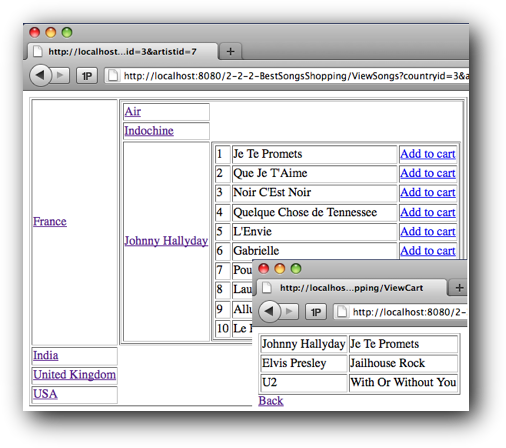
Enhance the web application developed previously so that users can add specific songs to a shopping cart. Multiple users browsing from different computers should be able to have their distinct shopping carts. Each user should be able to clear his own cart at any time.

Back.

This topic is part of our Web Application Development in Java training

Our forthcoming training courses

  • No training courses are scheduled.
« Previous Page
Next Page »

Looking for something?

Want to know more?

Get our newsletter

Discover the latest news, tips and tricks on Linux, the Web and Mobile technologies every week for FREE

This work is licensed by Knowledge7 under an Attribution-NonCommercial-ShareAlike 4.0 International (CC BY-NC-SA 4.0) license.