Knowledge7

The Linux and Mobile Solution Provider

  • About
  • Training
  • Services
  • Clients
  • In the news
  • Blog
  • Contact Us
You are here: Home / Archives for Topic

Generics and Concurrency in Java

This topic is part of our Object-Oriented Programming in Java training

Java is a powerful programming language and, in order to become a productive programmer, one of the best books to read is Effective Java by Joshua Bloch. In it, one can learn about how to use the object-oriented capabilities of the language to build software with quality attributes such as maintability and flexibility.

Generics

Since version 5, Java also provides constructs for generic programming which we are going to explore now.

Generics allow programmers to construct generic data structures. Java already provides generic lists and maps which we have been using in the previous applications we wrote. They are called generic simply because they allow for any kind of objects without any constraints.

Generic Memorizer

Write a Java class which implements a generic memorizer class that remembers the last five values it was asked to memorize. A test program should instantiate an Integer as well as a String memorizer, make them memorize ten values (of course, only the last five values are going to be memorized) and display their contents on screen.

RandomElement

Write a Java class called RandomElement which contains one method called takeOne which return a random element from any collection passed as a parameter. A test program should then create a collection of a specific kind and check whether takeOne works as expected. (takeOne needs to be a generic method).

Concurrency

Java provides various constructs and libraries which allow the programmer to write concurrent programs. The basic capabilities include Threads and Runnables.

MultithreadedCounter

Write a concurrent Java program which creates two distinct threads that respectively increments and decrements a volatile integer variable initialised to 0, waits for 10 seconds then stops the two threads and displays the value stored in the variable.

Modify the program to create 50 incrementer threads and 50 decrementer threads. What do you notice?

Modify the program to use an Executor instead. Is it better? What is the difference between the shutdown and shutdownNow methods?

ProducersAndConsumers

Write a Java program that creates 10 producers of random numbers between 0 and 999 and 10 consumers. Use a LinkedBlockingQueue with a maximum queue size of 10000 to store the numbers being produced and being consumed. Make sure that the producers and consumers are stopped after 10 seconds.

Future Fibonacci

Write a Java program that slowly calculates the Fibonacci of various numbers concurrently. The program should pause for 5 seconds while the calculations are being done and display all completed results. Then the program should pause for enough time for the remaining calculations to be done and display the remaining results. The program should used Futures.

This topic is part of our Object-Oriented Programming in Java training

Our forthcoming training courses

  • No training courses are scheduled.

Design Patterns in Java

This topic is part of our Object-Oriented Programming in Java training

Once someone understand sound object-oriented analysis, design and programming principles, typically by reading a good book on Object-Orientation (such as Applying UML and Patterns: An Introduction to Object-Oriented Analysis and Design and Iterative Development by Craig Larman) and programming real applications a lot, he/she can then embark upon mastering design patterns.

A Design Pattern is a solution which experienced software developers have been using over the years when they have to solve a given type of problem. Useful design patterns include:

  • creational patterns like Abstract factory and Singleton,
  • structural patterns like Adapter (or Façade) and Composite and
  • behavioral patterns like Observer and Strategy

One good way to learn about Design Patterns is to write real software applications which, at their core, use patterns in order to solve real problems.

First exercise: SecurityManager

In a lot of applications, there exist classes which need to have only one instance (one object created at runtime). Examples are database connections, security managers to verify passwords, credit card processors, etc.

Write a Java class called SecurityManager which only have one instance throughout the application. Use the Singleton design pattern.

Second exercise: IOFacade

Frequently, we need to hide a set of classes with a complex interface behind a simpler class. This happens, for example, when reusing code written by another team of programmers.

Write a Java class called IOFacade which simplify the use of the Java I/O facilities by making exceptions less intrusive. Use the Façade design pattern. (This pattern is somewhat related to the Adapter as used in InputStream -> InputStreamReader -> BufferedReader.)

Third exercise: Observers

In a lot of operating systems and online services, observers register their interest for a specific event and, when this event happens, the subject of the event notifies all the observers. This allows all the observers to know that the event has occurred without having to resort to polling (which is wasteful of resources).

Write a Java program allows Observers to be added to Subjects. When the state of the Subject changes, all Observers should be immediately notified. Use the Observer design pattern.

Fourth exercise: Solar System

Finally, quite a lot of applications e.g. desktop environments such as Gnome or Windows, vectorial drawing apps, word processors, ERP systems, etc. need to model hierarchies e.g. graphical widgets, shapes, words and people / products.

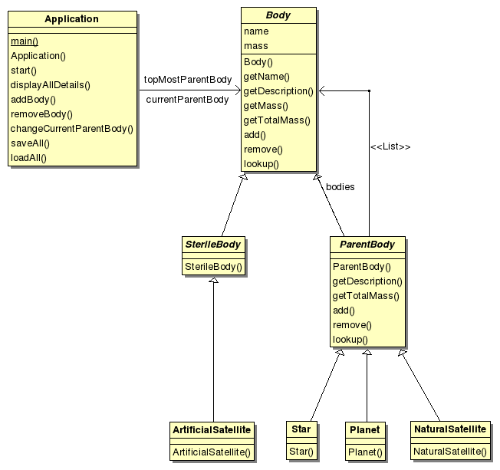
As a tribute to Dennis Ritchie, write a Java program that models the whole of the Solar System including the star, planets, natural satellites and artificial satellites. Use the Composite design pattern. The class diagram for the Solar System application is:

This topic is part of our Object-Oriented Programming in Java training

Our forthcoming training courses

  • No training courses are scheduled.

Object-Oriented Programming using Java

This topic is part of our Object-Oriented Programming in Java training

Developing software using object-oriented principles require a programmer to have a sound understanding of a number of important concepts:

  • Object-Oriented Analysis: what is the problem to be solved?
  • Object-Oriented Design: how are we going to solve the problem
  • Object-Oriented Programming: actually implementing the solution using an Object-Oriented Programming Language

One good way to learn Object-Oriented Analysis and Design is to read Applying UML and Patterns: An Introduction to Object-Oriented Analysis and Design and Iterative Development by Craig Larman. In it, the author explores ways to use the Unified Modeling Language (UML) and Design Patterns to create object-oriented software which are resilient to change and which have a sound architecture.

First exercise: Phone-Book

The first exercise is to Write a Java program which allows the user to manipulate a phone-book. The program should allow for the creation of new name/number pairs, searches and deletions (three use-cases which belong to the use-case diagram).

The software to be written needs to find solution for each of the three use-cases, needs to be object-oriented and each class written needs to be unit tested using the JUnit framework.

The steps to follow are:

  • Draw the use-case diagram
  • For each use-case, draw a sequence diagram
  • From the sequence diagrams, derive a class diagram
  • For each class identified, implement it in Java
  • Immediately test each class using JUnit
  • Write a test suite
  • Write the main application providing a simple text interface for the application

Second exercise: Simple E-Commerce Application

Write a Java application which allows the user to add products to a shopping cart. The total cost (taking in account shipping rates should always be displayed). The application should ideally have a graphical interface.

The different products are books and CDs (Interestingly, both have now been replaced by their e-variants: e-books and music streaming using services such as Pandora and Spotify!). Any product has a name, a price and a shipping rate (which is dependent on the type of product). A  book ships for Rs 200.00 and a CD ships for Rs 100.00.

The shopping cart should allow the user to add products to it and should know how to calculate its total price (which includes the prices and shipping rates of each product it contains).

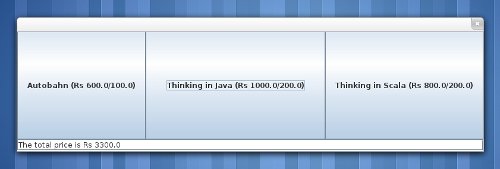
To evaluate whether the shopping cart works correctly or not, it is important to build a main application. In the previous exercise, we built a text interface. For this e-commerce application, we are going to build a simple graphical user interface for it (as shown on the left).

The key elements are a set of buttons which when clicked on add the corresponding product to the initially empty shopping cart. The total price of the shopping cart is always shown on the status line (at the bottom of the application). We are going to use the Swing library to build the graphical interface. Swing is relatively straightforward if its essential concepts are understood, namely the JFrame, the JTextField, the JButton and, very importantly its method, addActionListener).

This topic is part of our Object-Oriented Programming in Java training

Our forthcoming training courses

  • No training courses are scheduled.

String Manipulation and Collections

This topic is part of our Object-Oriented Programming in Java training

Strings

In Java, Strings are immutable i.e. cannot be changed and this explains why there exists other kinds of strings in the language, namely StringBuffers (since the beginning) and StringBuilders (since Java 5.0).

The best way to understand the syntax and semantics of strings in Java is to write progressively more complex programs. The work to do is:

  • Write a Java program which reads a sentence and a number of repetitions from standard input. The program should then create a string which is the sentence repeated the specified number of times. The string should then be displayed on standard output.
  • Write a Java program which reads words from the system dictionary and finds all the words with start with “aba”. Those words followed by their capitalized versions are printed. In Unix, the system dictionary is a normal text file at /usr/share/dict/words
  • Write a Java program which reads words from the system dictionary and finds and print all the words with match with a regular expression entered by the user.

Collections

Java has a rich class library containing two very important kinds of collections: Lists and Maps. Lists are linear structures which can contain several elements. Typical lists include ArrayLists and LinkedLists. Maps are what are known as associative arrays in other programming languages and, when used properly, give the programmer a lot of power and flexibility. In order to master Lists and Maps, it is important to write actual Java applications. The work to do is:

  • Write a Java program that prompts the user for marks obtained by students for one exam and displays on screen the best mark and the average mark.
  • Write a Java program that prompts the user for words and displays for each unique word the number of times it was typed.
  • Write a program which finds all anagrams from the system dictionary. Two distinct words are anagrams if they contain the same letters.

Do not forget to refer to the Java API Specification when needed.

This topic is part of our Object-Oriented Programming in Java training

Our forthcoming training courses

  • No training courses are scheduled.

Fundamentals of Java and Input/Output

This topic is part of our Object-Oriented Programming in Java training

Java is a platform. It consists of:

  • a virtual machine capable of running bytecodes
  • a compiler which transforms Java code into bytecodes
  • a programming language
  • a standard library

The virtual machine, the compiler as well as the various components of the standard library have been released as open-source software by Sun (now owned by Oracle) and, consequently, the Java platform is well supported on all computer platforms. Forks of Sun’s original Java include OpenJDK.

Java was designed by James Gosling in 1995 to power embedded devices and, in 2012, Java powers Android smartphones and tablets and Blu-Ray drives for example. Java has also proved to be very successful in enterprises. Applications written in Java and conforming to the Java Enterprise Edition set of specifications are found in most of the large companies.

Setting up the development environment

  • Make sure Java is installed
  • Install the IntelliJ IDEA Community Edition IDE
  • Write a Java program that displays the string of characters “Hello World” on standard output

Like Java, Eclipse is an open-source software (originally done by IBM) and, since then, has become a very important integrated development environment for Java and Android. Other IDEs used to do Java development are Netbeans and Eclipse.

Developing applications

Java is an imperative programming language, supports object-oriented programming and has a C-like syntax. The best way to learn how to program in Java is to develop progressively more complex applications. The work to do is:

  • Write a Java program that displays a multiplication table for a specific number on the standard output.
  • Write a Java program that calculates and displays the factorial of a specific number using both the recursive and iterative algorithms. When this is done, enhance the iterative version to work with big numbers.
  • Write a Java program which uses the algorithm devised by Eratosthene to display all the prime numbers which are less or equal to a specific maximum number.

Input / Output

Computer applications generally read data from input devices (e.g. the keyboard), process the data in some way and display results on output devices (e.g. a screen)

  • Write a Java program which reads integers from standard input and print out their sum on standard output. The program should read integers until the string “END” is encountered.
  • Write a Java program that prompts the user for a number of seconds (an offset), displays the current date and time and also the date and time after that offset.

In order to write those programs, it is important to understand how Input / Output is done in Java as well as how the platform handles times and dates. The relevant information is found in the Java API Specification.

This topic is part of our Object-Oriented Programming in Java training

Our forthcoming training courses

  • No training courses are scheduled.

Extending servlets with Java Database Connectivity (JDBC)

This topic is part of our Web Application Development in Java training

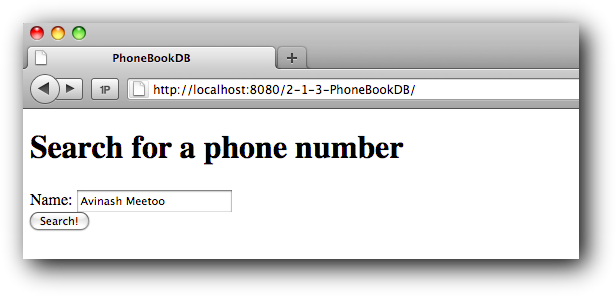
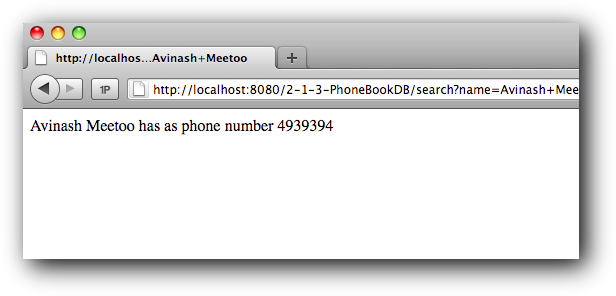
The next web application we will create will allow us to look for the phone number of someone given his name:

Clicking on the Search! should display the phone number of the person if the name exists and an appropriate error message if not.

We are going to use an HMTL form and a servlet for the searching for the phone number. The new aspect is that we are going to store the names and numbers in a database in a table similar to this:

CREATE TABLE phonebook (
  name varchar(255) NOT NULL,
  number varchar(255) NOT NULL,
  PRIMARY KEY (name)
);

The work to do is to create an appropriate database, create such a table in it and populate that table with some test data.

Then, write a Java web application in which a servlet connects to and searches for phone numbers in the database. Use the Java Database Connectivity (JDBC) API. [NB: As we use MySQL, it is important to use Connector/J, the official JDBC driver for MySQL.]

Enhancing the application with proper caching

As it is now, a SQL query is issued each time someone looks for a name… even if that’s for the same name. In other words, searching for the phone number of the same person many times will systematically query the database. It would be more intelligent to query only once (the first time) and then memorise (cache) the resulting phone number.

The rationale behind this is to minimise the number of SQL queries while preserving the semantics of the application (Discuss!) i.e. increase overall performance and decrease the use of critical resources.

Drilling down

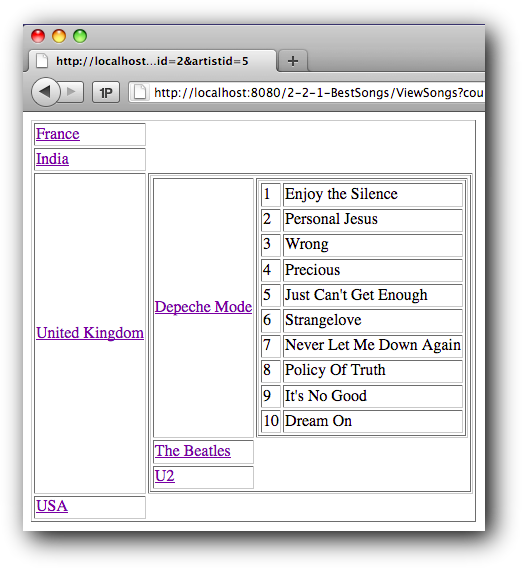
A lot of database applications are used to drill down data presented in a hierarchical manner. For instance, we may have different countries on the first level and clicking on one of the countries reveals artists from that country. Similarly, clicking on an artist reveals songs by that artist.

The objective is the build such a web application using servlet(s) and JDBC only based on the following database schema:

CREATE TABLE `countries` (
  `countryid` int(11) NOT NULL auto_increment,
  `name` varchar(255) NOT NULL,
  PRIMARY KEY  (`countryid`)
);

CREATE TABLE `artists` (
  `artistid` int(11) NOT NULL auto_increment,
  `name` varchar(255) NOT NULL,
  `countryid` int(11) NOT NULL,
  PRIMARY KEY  (`artistid`),
  KEY `countryid` (`countryid`)
);

CREATE TABLE `songs` (
  `songid` int(11) NOT NULL auto_increment,
  `rank` int(11) NOT NULL,
  `name` varchar(255) NOT NULL,
  `artistid` int(11) NOT NULL,
  PRIMARY KEY  (`songid`),
  KEY `artistid` (`artistid`)
);

ALTER TABLE `artists`
  ADD CONSTRAINT `artists_ibfk_1`
  FOREIGN KEY (`countryid`) REFERENCES `countries` (`countryid`)
  ON DELETE CASCADE ON UPDATE CASCADE;

ALTER TABLE `songs`
  ADD CONSTRAINT `songs_ibfk_1`
  FOREIGN KEY (`artistid`) REFERENCES `artists` (`artistid`)
  ON DELETE CASCADE ON UPDATE CASCADE;

Interestingly, the application can be built either using one do-it-all servlet or using three distinct servlets (e.g. ViewCountries initially, then ViewArtists, then ViewSongs). When three such servlets are used, it is important that only one (shared) database connection is used throughout.

Back.

This topic is part of our Web Application Development in Java training

Our forthcoming training courses

  • No training courses are scheduled.

Creating a web application using servlets

This topic is part of our Web Application Development in Java training

We will now create a non-trivial Java web application which will require the use of a servlet.

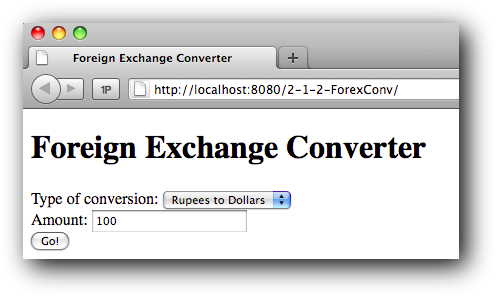
First of all, let’s create a simple HTML page containing a form to allow the user to choose a type of conversion (Rupees to Dollars / Dollars to Rupees) and the amount to convert. At this point, clicking on Go! makes no sense (but try it!)

The second step is to add a servlet to the web application which will handle the conversion. The servlet will be called with two parameters, the type of conversion and the amount, through the HTTP GET (or POST) request. [NB: We will have to add the servlet-api.jar to the web application WEB-INF/lib folder. Get the jar from Tomcat.]

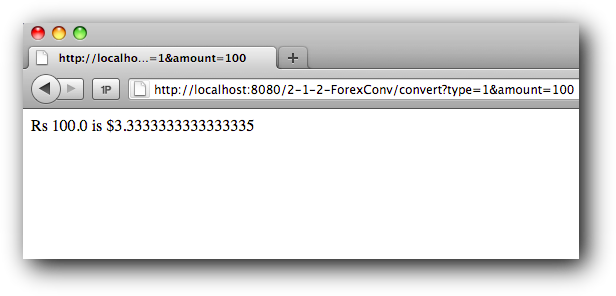
The servlet will then have to get the parameters from the request, validate them and calculate a new amount based on some hard-coded conversion rate (e.g. 1 Dollar is 30 Rupees). This value should then be sent back to the browser (in an HTTP response) for display.

Export the WAR file and examine its contents. Can you see the Java servlet in it? Is it in source code form or in compiled form?

Enhancing the application

As it is, the web application uses a hard-coded conversion rate and this is artificial as, in real life, this rate changes daily. Update the web application to retrieve the conversion rate from a web service.

To make things simple, we are going to assume that the exchange rate is available at an URL similar to www.server.com/exchangerate.txt (see, web services can be simple!) And, because we are dealing with resources which are accessed through a URL, use a Java URL object during the implementation.

Back.

This topic is part of our Web Application Development in Java training

Our forthcoming training courses

  • No training courses are scheduled.

Installing and configuring a servlet

This topic is part of our Web Application Development in Java training

For developing web applications in Java using Servlets and JSP, we will use the following software:

  • OpenJDK: an open source implementation of the Java Platform. OpenJDK is part of most Linux distributions now (as well as on Mac OS X) but needs to be manually installed on Windows.
  • Apache Tomcat: an open source software implementation of the Java Servlet and JavaServer Pages (JSP) technologies. Tomcat is a web container in which web applications written in Java can be deployed for execution.
  • SpringSource Tool Suite: a powerful variant of the open source Eclipse development environment for building Java enterprise applications. STS can be used to create web application in Java and it can also deploy those applications automatically to Tomcat. STS is made by the same people behind the Spring framework.

Installation

As mentioned above, OpenJDK is already installed in Linux. Tomcat and STS need to be installed manually.

Work to do

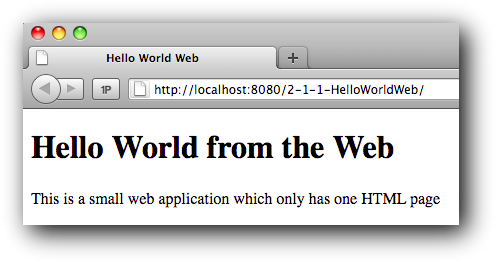
To check whether the whole environment is setup properly, we will create a small (but fully functional) HelloWorldWeb application using STS and deploy it to Tomcat. On execution, we expect the following:

After testing, export the project as a WAR file and examine the contents of the archive. This WAR file is what is being sent to Tomcat by STS.

This is an overview of how Tomcat works.

Back.

This topic is part of our Web Application Development in Java training

Our forthcoming training courses

  • No training courses are scheduled.

Handling mobile events

This topic is part of our Mobile Application Development with HTML5 training

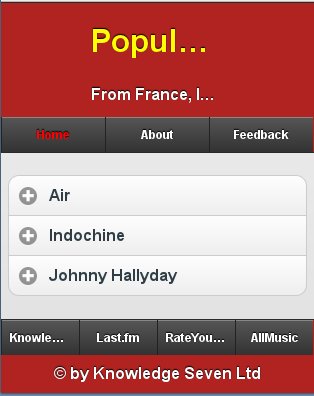
jQuery Mobile has a number of hooks to handle events such as taps, swipes, etc. In addition to those, the framework also provides more general events such as pageinit and pagebeforeload which allow code to be executed at specific instants in the lifecycle of a page. Finally, there are also a number of methods which can be used to change the behaviour of the web application when specific events occur.

The work to do is:

  • Change the Javascript code already written to be more jQuery Mobile compliant
  • Add a handler for swipeleft on the four songs pages
  • Add a tap handler on the names of the French songs to display a dialog
This topic is part of our Mobile Application Development with HTML5 training

Our forthcoming training courses

  • No training courses are scheduled.

Services and Notifications

This topic is part of our Android Application Development training

Some Android application depend on data available on the Web. For example, a TopTracks application might show the top 10 tracks of a given artist using a web service such as AudioScrobbler.

Downloading this data can be slow and it is preferable to use a service to do that. In this way, the “main screen” of the application is an Activity and only takes care of displaying the user interface and starting / stopping the download service.

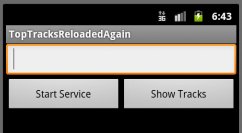
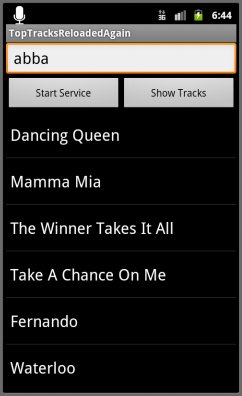
The application to develop allows the user to enter the name of an artist:

Click on Show Tracks does not necessarily display the tracks as this requires the track information to be downloaded first. This is done by clicking on Start Service.

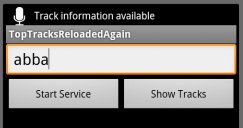
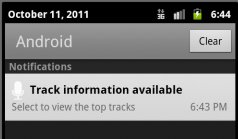
When the data has been downloaded, the service displays a notification in the status bar telling the user that the top tracks have been downloaded. It is only then that the user can click on Show Tracks to get:

This topic is part of our Android Application Development training

Our forthcoming training courses

  • No training courses are scheduled.
« Previous Page
Next Page »

Looking for something?

Want to know more?

Get our newsletter

Discover the latest news, tips and tricks on Linux, the Web and Mobile technologies every week for FREE

This work is licensed by Knowledge7 under an Attribution-NonCommercial-ShareAlike 4.0 International (CC BY-NC-SA 4.0) license.